BridgeAI
AI Integration Copilot that automates workflows across your business tools
Technologies
BridgeAI: AI Integration Copilot
The Problem
Business professionals waste hours switching between multiple tools (CRM, email, calendar, team chat) to complete simple tasks. Manual data entry, context switching, and repetitive workflows reduce productivity.
A sales rep's typical morning might involve:
- Opening HubSpot to check lead status
- Switching to Gmail to read related emails
- Checking Google Calendar for meeting availability
- Manually updating CRM records based on email content
- Creating follow-up tasks and sending emails
Each task requires switching apps, copying information, and performing repetitive actions. This context switching kills productivity and increases the chance of errors.
The Solution
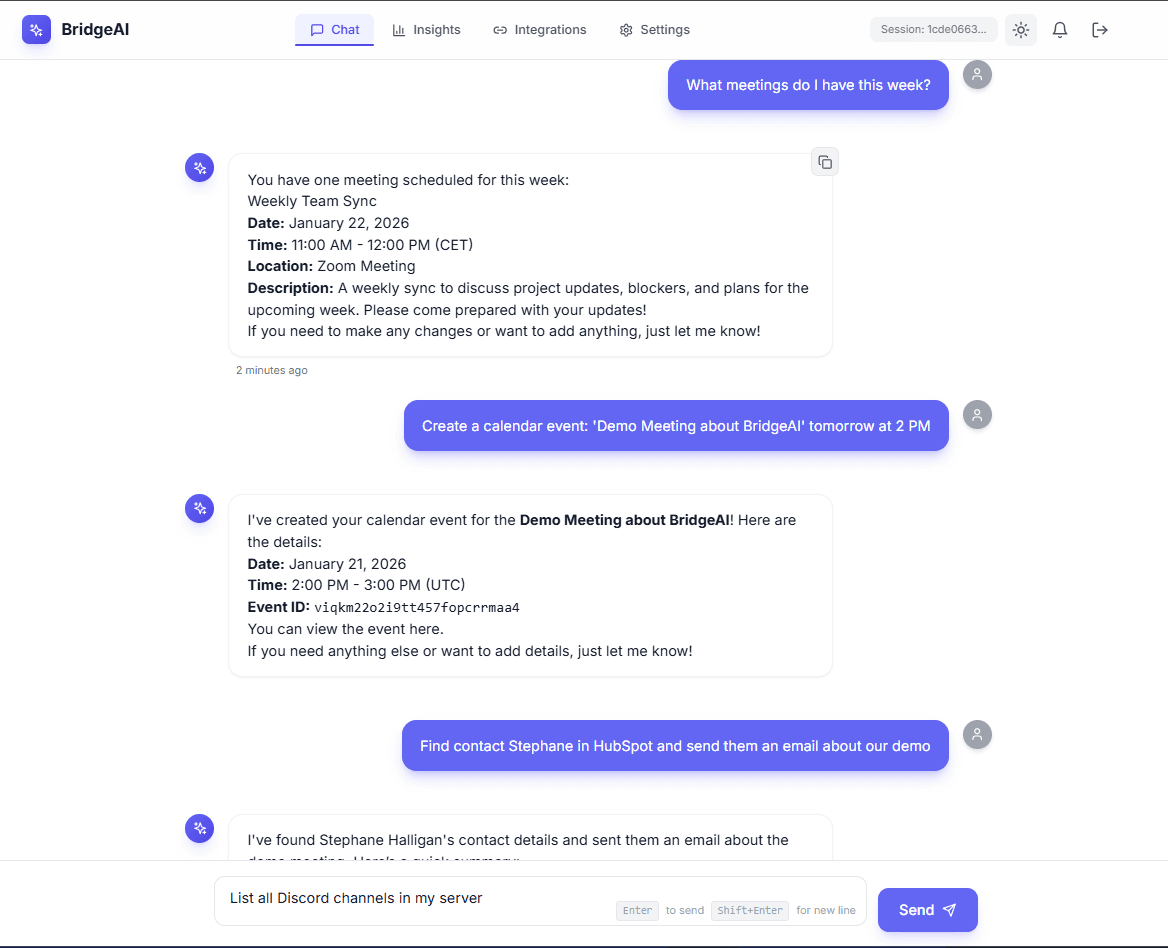
BridgeAI is an intelligent AI assistant that unifies access to HubSpot CRM, Gmail, Google Calendar, Discord, and Google Drive. Instead of manually switching between tools, users simply describe what they need in natural language, and BridgeAI automatically orchestrates multi-step workflows across these tools.
Example: Instead of manually checking HubSpot, reading emails, and updating records, a user can simply say: "Find all leads that need follow-up today, summarize my emails from this week, and create CRM notes for the important ones." BridgeAI handles the entire workflow automatically.
What I Built
1) Multi-Tool Integration
BridgeAI connects to five major business tools through secure OAuth flows:
- HubSpot CRM: Search contacts and companies, update contact properties, create notes and activities
- Gmail: Read emails with advanced search, send new emails, reply to existing conversations
- Google Calendar: List upcoming events, create new meetings, update event details, read meeting information
- Google Drive: Access meeting transcripts, list files, read document content, create formatted documents
- Discord: Send messages to channels, read channel messages, list available channels for team communication
All integrations use OAuth2 authentication, ensuring users maintain control over their data and can revoke access at any time.
2) AI-Powered Workflow Automation
BridgeAI uses LangGraph for sophisticated agent orchestration, enabling complex multi-step workflows:
Single-Step Operations:
- "Search for contacts in HubSpot" → Finds and summarizes matching contacts
- "Show me recent emails" → Lists and summarizes recent Gmail messages
- "What's on my calendar today?" → Displays today's events with details
Multi-Step Workflows:
- "Find contact John and send them an email" → Searches HubSpot, extracts email, composes and sends email
- "Summarize my meetings and create CRM notes" → Reads calendar, analyzes transcripts, generates summaries, creates HubSpot notes
- "Check calendar and send meeting reminders" → Lists upcoming events, extracts attendees, sends reminder emails
The agent automatically breaks down complex requests into sequential tool calls, using the results from one step to inform the next.
3) Conversation Persistence
BridgeAI maintains conversation context across sessions using LangGraph checkpoints stored in PostgreSQL. This means:
- Conversations continue seamlessly even after closing the browser
- The agent remembers previous context and can reference earlier interactions
- Multi-step workflows can span multiple messages
- Users can resume conversations days later with full context
Example: A user starts a workflow on Monday, asks BridgeAI to "research Acme Corp and prepare a summary." On Wednesday, they can continue with "add that summary to my CRM" and BridgeAI knows exactly which company and summary they're referring to.
4) Real-Time Streaming Responses
The chat interface uses Server-Sent Events (SSE) to stream agent responses in real-time. Users see responses appear as they're generated, rather than waiting for the entire workflow to complete. This provides immediate feedback and makes long-running workflows feel responsive.
5) Discord Bot Integration
BridgeAI includes a Discord bot that allows teams to interact with the assistant directly from Discord channels. Team members can ask questions, trigger workflows, and get responses without leaving their team chat environment.
6) Meeting Analysis
BridgeAI can read meeting transcripts from Google Drive, analyze them, and extract key information:
- Meeting Summaries: Automatically generate concise summaries of meeting discussions
- Action Items: Extract and list action items mentioned during meetings
- Key Decisions: Identify and document important decisions made in meetings
This transforms raw meeting transcripts into actionable insights that can be automatically added to CRM systems or shared via email.
Technical Deep Dive
How It Works
BridgeAI follows a request-response flow with state persistence:
- User sends message via the Next.js frontend
- FastAPI backend receives the request and authenticates the user
- LangGraph agent processes the message, deciding which tools to use
- Tools execute API calls to HubSpot, Gmail, Calendar, Drive, or Discord
- Agent continues using tool results to inform next steps
- Response streams back to the frontend via Server-Sent Events
- Checkpoint saved to PostgreSQL, preserving conversation state
Technology Stack
Backend:
- FastAPI (Python 3.12+): High-performance async API framework
- LangGraph: Agent orchestration with state management
- LangChain: Tool definitions and OpenAI integration
- PostgreSQL 16: User data, integrations, and LangGraph checkpoints
- OAuth2: Secure authentication for all integrations
Frontend:
- Next.js 14: React framework with App Router
- TypeScript: Type safety across the application
- React Query: Server state management
- Tailwind CSS: Styling and responsive design
AI:
- OpenAI GPT-4o-mini: Language model for reasoning and tool selection
- LangGraph Checkpoints: Conversation state persistence
Key Technical Decisions
LangGraph for Orchestration: LangGraph provides a graph-based approach to agent workflows, allowing complex multi-step tasks with conditional routing. The checkpoint system ensures state persists across sessions, enabling seamless conversation continuation.
PostgreSQL for Checkpoints: Using PostgreSQL for both application data and LangGraph checkpoints simplifies the architecture. The checkpoint system automatically handles state restoration, so the agent can resume conversations exactly where they left off.
OAuth2 for All Integrations: OAuth2 provides secure, industry-standard authentication without requiring users to share passwords. The system handles token refresh automatically, ensuring integrations remain connected without user intervention.
Server-Sent Events for Streaming: SSE provides real-time response streaming without the complexity of WebSockets. This gives users immediate feedback during long-running workflows while keeping the implementation simple.
Production Impact
Before BridgeAI
A sales rep's morning routine:
- Open HubSpot → Search for leads → Check each one (30 minutes)
- Open Gmail → Read emails → Manually update CRM (20 minutes)
- Check calendar → Review meetings → Create follow-up tasks (15 minutes) Total: 65 minutes
With BridgeAI
The same workflow:
- Type: "Show me all leads that need follow-up today and summarize my emails"
- BridgeAI handles everything automatically
- Review the summary Total: 2 minutes
Use Cases
Sales Teams:
- Automatically research prospects and create CRM records
- Generate meeting summaries and extract action items
- Send personalized follow-up emails based on CRM data
Operations Teams:
- Monitor team communication in Discord
- Automate calendar coordination and meeting scheduling
- Generate reports from multiple data sources
Individual Professionals:
- Reduce context switching between tools
- Automate repetitive data entry tasks
- Maintain organized records across all business tools
Architecture Highlights
The system is built with production-ready patterns:
- Modular Integration Architecture: Each integration (HubSpot, Gmail, etc.) is a separate module with standardized interfaces
- Tool-Based Agent Design: LangChain tools provide a clean abstraction for API operations
- State Management: LangGraph checkpoints ensure conversation continuity
- Real-Time Communication: SSE streaming provides responsive user experience
- Secure Authentication: OAuth2 flows with encrypted token storage
BridgeAI demonstrates how modern AI agent frameworks can be combined with real business APIs to create powerful automation tools that save time and reduce errors.
Want to Build Something Similar?
I specialize in building production-ready AI systems that scale. Let's discuss your project.
Related Content
Related Projects